Tag Archives: email

Will the Amazon Kindle Fire Defeat the Powerful Apple Ipad 2?

I’m reading a lot of blogging that is exactly this subject: Will the Amazon Kindle Fire defeat the powerful Apple Ipad 2? I’m going to go out on a limb and just say no. It won’t. But instead of treating this as an either/or situation, I’m going to talk about why the question shouldn’t be asked in the first place.

You see, the Apple Ipad is in a class of its own, a class to which no tablet has come close yet. The Motorola Xoom was released as the potential “Ipad killer” but it did no such thing. As a matter of fact, shortly after releasing the Motorola Xoom, the Motorola Xoom became the Motorola Xoom killer. It was decently constructed, had no apps made for it and relied on an app market that is woefully inadequate. To this day, I have a Xoom but I don’t use it for anything other than checking email at night (while my Ipad charges). Even when you found an app that might work for it, quite often it didn’t, and instead you ended up having to uninstall something you paid for (and couldn’t get paid back for if it didn’t work).

For months now, the talk has been all about the new tablet that was going to be released by Amazon. And it looks like it’s about to be released. Here are some of the particulars:

It has only wifi, it’s in color, and it has some apps it can run but they come mainly from Amazon’s online app store. It only has 8 gigs of RAM, and they’re not planning to up that on this particular model (although they might on subsequent versions of the model to be released later). Like I said, it has wifi only, so there’s no 3G, like you get for the main Kindle. And it will cost about $199.

Thoughts? The price is great. It serves as a great replacement for a Kindle if you already have one. It will do a few more things than a Kindle can do, like check email, and maybe play some music and videos (not sure on that last one yet, although details seem to point in that direction). What I really like about it is that now I can read books on a Kindle that has color (whereas I was reading my Kindle books on a Kindle app on my Ipad, because it was the only way to see color on a Kindle-bought book).

It’s not a replacement for the Ipad because it’s not as powerful as an Ipad, doesn’t do as much as an Ipad, and well, it’s just not an Ipad. It’s another Kindle, which will do what normal Kindles do, but be more like a Barnes & Noble Nook Color but not as dysfunctional as that product.

I’ll probably buy one. Do I need one? No. Not really. But I have a Kindle, and I like my Kindle. This will be a Kindle capable of doing more things than my current day Kindle, and I sort of like that. But it won’t replace my Ipad, which is still the one device I carry with me everywhere.
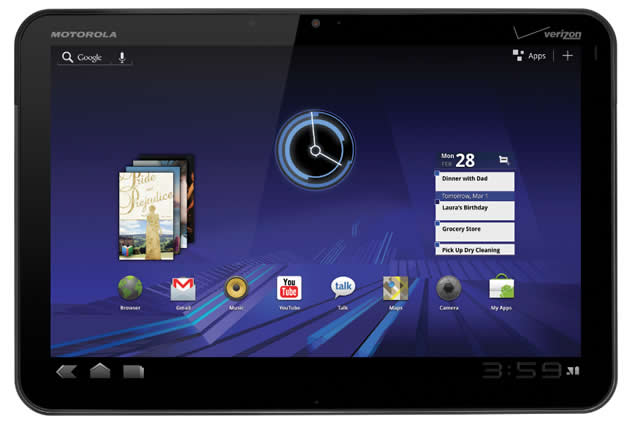
My Reflections on the New Motorola Xoom (having just bought one)

I was at the Apple Store again today, looking at buying an Ipad 2 for my cartooning work, and when I arrived, I was told that I could sit outside of the store in a line when someone from the store would come out and inform me if I would be allowed to buy one of their Ipads. Having been trying to buy one for a few weeks now and not really interested in waiting 3 weeks for an online version of one (I like to see what I’m buying before I actually buy it and don’t trust large equipment through the mail yet). After waiting for awhile, one of the “geniuses” (yes, they call themselves that) came out and informed me that I was not worthy enough to buy an Ipad 2 today. So I was sent home without one, but told that I could come back the next morning and ask for permission to be sent away again.

So, later on today, I was at Costco, and I happened to see that they finally got in the Motorola Xoom wifi tablets for $589. So I bought one. Didn’t want 3G, so this was exactly what I wanted.

Got it home, and it worked just great right out of the box.

Now, having said that, there are some complications that are kind of frustrating with the thing. Google is the overarching mind behind this tablet, and you can never really get around that, but what was annoying was that it was very difficult to figure out what I could run on the thing and what wouldn’t run on it. So, basically, I had to keep downloading apps, try it out, and then delete it because while it might work with a phone, a LOT of them didn’t work for the 3G. What was really annoying was finding something that could play WMV files. Finally, I got one that sort of works. To be honest, I would have been happy to have actually found iTunes for Android, but their app store was so confusing that to this day I don’t know how to get the actual music player that comes with the device to actually play any other music than the samples that came on the Xoom. I have libraries of my own music, and I gave up after some time trying to figure out how to get to play it.

So I went and looked for an imaging program, finding a couple of them that seemed okay, but didn’t really seem exactly what I wanted. So that’s going to be something that will take time.

Even though it runs everything Google, couldn’t figure out how to actually get the Google Bookstore to work, even though there’s an app on the main screen for doing just that. It just says it’s not installed. Kinda fubar, if you ask me. So I ended up installing Kindle for Android, and well, screw Google and their stupid store.

So, so far I’m not all that impressed with the Xoom. It will probably do a lot of the things I need it to do, like check email, and eventually I’ll have a program for creating my cartoons/comics and then importing them to my computer. And I’m sure there are a bunch of other things that I’ll be able to do with it as well because it does seem pretty cool with what I’ve been able to ascertain from it so far. Again, it’s not the end all of devices, but it sure beats waiting for the gods of Apples to bestow upon me the right to buy one of their pieces of walled garden shit.

So I’m saying….